React vs Angular vs Vue in 2026: Which Should Beginners Learn?
A beginner-friendly comparison of React, Angular and Vue: how each works, how hard each is to learn, and how to choose the right first framework.
If you’re starting web development, you’ll quickly hit the big question: React vs Angular vs Vue, which one should I learn first? Forums are full of strong opinions, and every option has passionate fans. The truth is that all three are solid, actively maintained tools used to build real products. The right choice depends on how you like to learn and what you want to build.
This guide compares the three in plain English: how each works, how steep the learning curve is, what the ecosystem looks like, and a simple way to decide. We’ll finish with a learning plan you can start this week.
Quick answer: For most beginners, React is a practical first choice because of its large ecosystem and community, while Vue is often the gentlest to learn. Angular suits learners who want a complete, structured framework and are happy to learn TypeScript early. Whichever you choose, learn core JavaScript first; the component ideas transfer between all three.
First, what do these tools actually do?
React, Angular and Vue all help you build the frontend of a web application: the part users see and interact with in the browser. If you’re unsure where frontend fits, our guide to frontend vs backend vs full stack explains the roles.
All three use components: reusable pieces of interface, such as a button, a product card or a navigation bar, that combine into full pages. All three update the page automatically when your data changes, so you don’t have to manipulate the page by hand.
The differences lie in how much they include, how you write components, and how opinionated they are.
React: the flexible library
React is a JavaScript library for building user interfaces, created and maintained by Meta with a large open-source community. The official React documentation is the best place to start.
How React feels to write
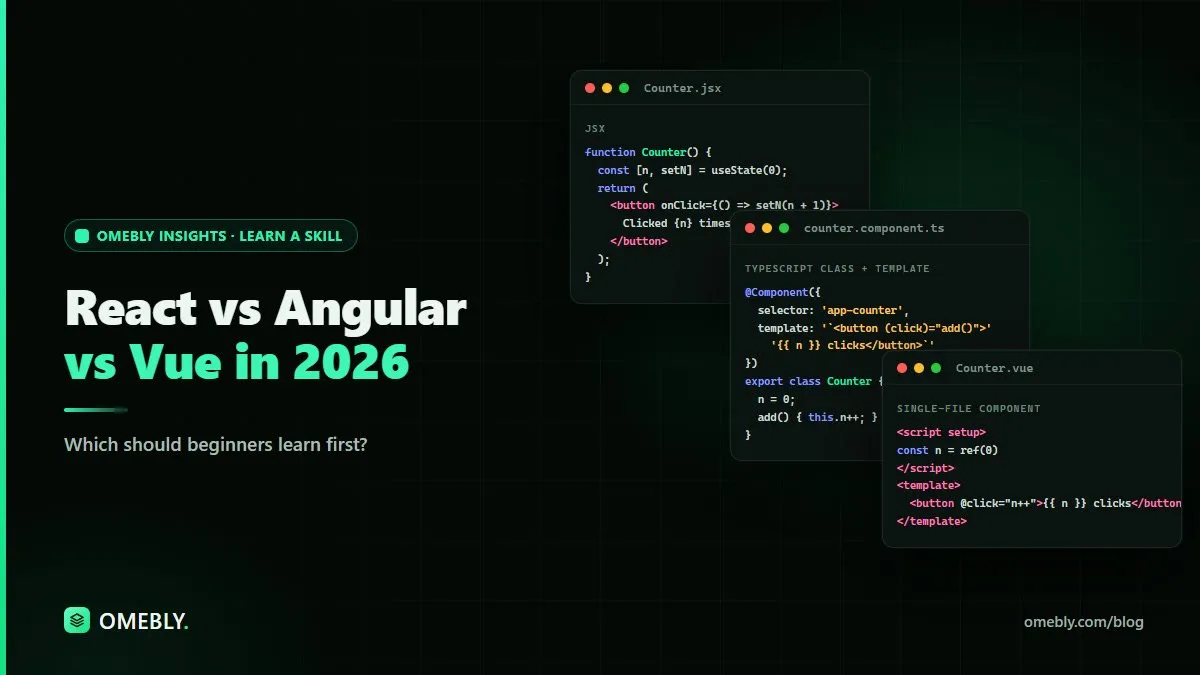
React components are JavaScript functions that return JSX, a syntax that looks like HTML inside JavaScript. You manage changing data with hooks, such as useState and useEffect.
Strengths
- A very large ecosystem of libraries, tutorials and community answers
- Flexible: you choose your own tools for routing, forms and data
- Popular full frameworks, such as Next.js, are built on top of it
- Skills carry over to mobile development through React Native
Trade-offs
- Because React leaves many choices to you, beginners can feel overwhelmed by options
- JSX takes a little getting used to
- Best practices evolve, so older tutorials can be out of date
Angular: the complete framework
Angular is a full framework maintained by Google. Its official site includes tutorials and guides.
How Angular feels to write
Angular uses TypeScript throughout, a version of JavaScript with types. Components combine a TypeScript class with an HTML template, and the framework includes routing, forms, an HTTP client and dependency injection out of the box.
Strengths
- Everything you need is included and designed to work together
- A clear, consistent structure, which suits large teams and long-running projects
- TypeScript catches many errors before your code runs
- Common in enterprise and business applications
Trade-offs
- The steepest learning curve of the three
- More concepts to learn before you build something small
- Can feel heavy for simple projects
Vue: the approachable middle ground
Vue is an open-source framework created by Evan You and maintained by a core team and community. The Vue documentation is known for being clear and beginner-friendly.
How Vue feels to write
Vue often uses single-file components, where a component’s template (HTML), logic (JavaScript) and styles (CSS) sit together in one file. Its template syntax looks close to standard HTML, which many beginners find familiar.
Strengths
- Often considered the easiest to pick up
- Can be added to an existing page gradually or used for full applications
- Official libraries for routing and state management
- Nuxt offers a full framework built on Vue
Trade-offs
- A smaller ecosystem than React’s
- Fewer learning resources overall than React, though the official docs are excellent
- Job listings vary by region, so research your local market
Side-by-side comparison
| React | Angular | Vue | |
|---|---|---|---|
| Type | UI library | Full framework | Progressive framework |
| Maintained by | Meta and community | Core team and community | |
| Language | JavaScript (TypeScript optional) | TypeScript | JavaScript (TypeScript optional) |
| Component style | Functions with JSX | Classes with HTML templates | Single-file components with templates |
| Learning curve | Moderate | Steeper | Gentle |
| Built-in features | Minimal; add libraries | Routing, forms, HTTP and more | Core plus official add-ons |
| Good for | Flexible apps of any size | Large, structured applications | Small to large apps; gradual adoption |
How to choose your first framework
Ask yourself these questions:
What do you want to build?
- A portfolio, startup idea or general web apps: React or Vue.
- Large business systems in a structured team: Angular is worth considering.
- Adding interactivity to an existing website: Vue is easy to introduce gradually.
How do you like to learn?
- You like freedom and picking tools: React.
- You like clear rules and one official way: Angular.
- You want a gentle start with clear docs: Vue.
What does your local market use?
Look at job listings and freelance projects in your city or target region. Use this as one input, not the only one, and remember that skills transfer between frameworks.
If you still can’t decide, pick React. Its large community means you’ll find answers to most beginner problems quickly. But don’t spend weeks deciding. Your first framework teaches you concepts you’ll reuse in the next.
A beginner’s learning plan
- Learn HTML and CSS basics. Structure and style a simple page.
- Learn core JavaScript. Variables, functions, arrays, objects, events, modules and fetching data from an API.
- Pick one framework and follow its official tutorial. Don’t mix three courses at once.
- Build small projects. A to-do list, a weather app using a public API, a product listing with filters. Our list of web development project ideas has more.
- Learn routing and state. Move from single components to multi-page apps.
- Deploy a project. Put it online and share the link in your portfolio.
- Learn a second framework later if your goals need it.
Using AI tools while you learn
AI tools like Claude can explain unfamiliar code, help you understand error messages and generate starter components. Used well, they speed up learning. A few rules help:
- Ask the AI to explain code, not just write it.
- Type code yourself rather than pasting large blocks you don’t understand.
- Check suggestions against official documentation, because AI can produce outdated or incorrect code.
- Don’t paste API keys, passwords or private company code into AI tools.
When documentation pages or technical guides get long, our free AI summarizer can give you a quick overview, but read the original for details.
How Omebly can help
If you’d like to learn frontend development with guided support, Omebly Academy’s Web Development with AI course shows how to build for the web while using AI tools responsibly. It runs for 8 weeks with 16 live classes and costs USD 280. Classes are taught live by Nazmul Hussain’s team; Nazmul Hussain is Omebly’s Managing Director and Technical Head, with 10+ years of experience building websites, apps and digital products.
If you want a broader foundation in building websites, see the Web Development course. You can compare every option on the Omebly Academy training page.
Ready to build your first real web app? See the Web Development with AI course.
Frequently asked questions
Which is easiest to learn: React, Angular or Vue?
Many beginners find Vue the gentlest start because its templates look like normal HTML. React is also approachable once you are comfortable with JavaScript. Angular has the steepest learning curve because it includes more built-in concepts and uses TypeScript throughout.
Should I learn JavaScript before a framework?
Yes. All three are built on JavaScript, so a solid grasp of variables, functions, arrays, objects, events and fetching data will make any framework much easier to learn.
Is Angular still worth learning in 2026?
Angular remains actively maintained by Google and is used for many large business applications. It suits learners who like structure and want a complete framework with routing, forms and data handling built in.
Can I switch frameworks later?
Yes. The core ideas, such as components, state, props or inputs, and routing, carry over between frameworks. Your second framework is much quicker to learn than your first.
Can AI tools help me learn a frontend framework?
AI tools can explain code, suggest fixes for errors and generate starter components. Use them to understand concepts rather than copy code blindly, and check suggestions against the official documentation.
Written by
Nazmul Hussain, Managing Director & Technical Head, Omebly. 10+ years building websites and apps for clients in India, the Gulf, the UK and the US, and mentoring at Omebly Academy. LinkedIn · GitHub
Follow Omebly
New guides, work and launches on every channel.