Website Hosting in India: Shared vs VPS vs Cloud
Shared, VPS or cloud hosting? A plain-English comparison for Indian businesses, covering speed, security, control, scaling, cost drivers and when to upgrade.
Your website can be well designed and still feel slow, crash during a sale or get hacked because of where and how it’s hosted. Yet many businesses pick hosting by price alone, or keep whatever plan came with their domain years ago.
This guide compares the three main types of website hosting in India: shared, VPS and cloud. You’ll learn how each works, the trade-offs in speed, security and control, what drives cost, and how to choose the right fit for your site today, with room to grow.
Quick answer: Shared hosting is the cheapest and simplest, and fine for small brochure sites with modest traffic. A VPS gives you a dedicated slice of a server with predictable performance and more control, and suits busier business sites and small stores. Cloud hosting runs on a pool of servers and scales up or down easily, which suits online stores, web apps and sites with traffic spikes. Choose a server location in or near India for Indian visitors, and pick managed hosting if no one on your team handles server updates and backups.
How website hosting works, in one minute
Hosting is the computer (server) that stores your website’s files and database and sends pages to visitors’ browsers. The type of hosting decides how much of that server is yours, how much control you have, and how easily it can grow.
A simple way to picture it:
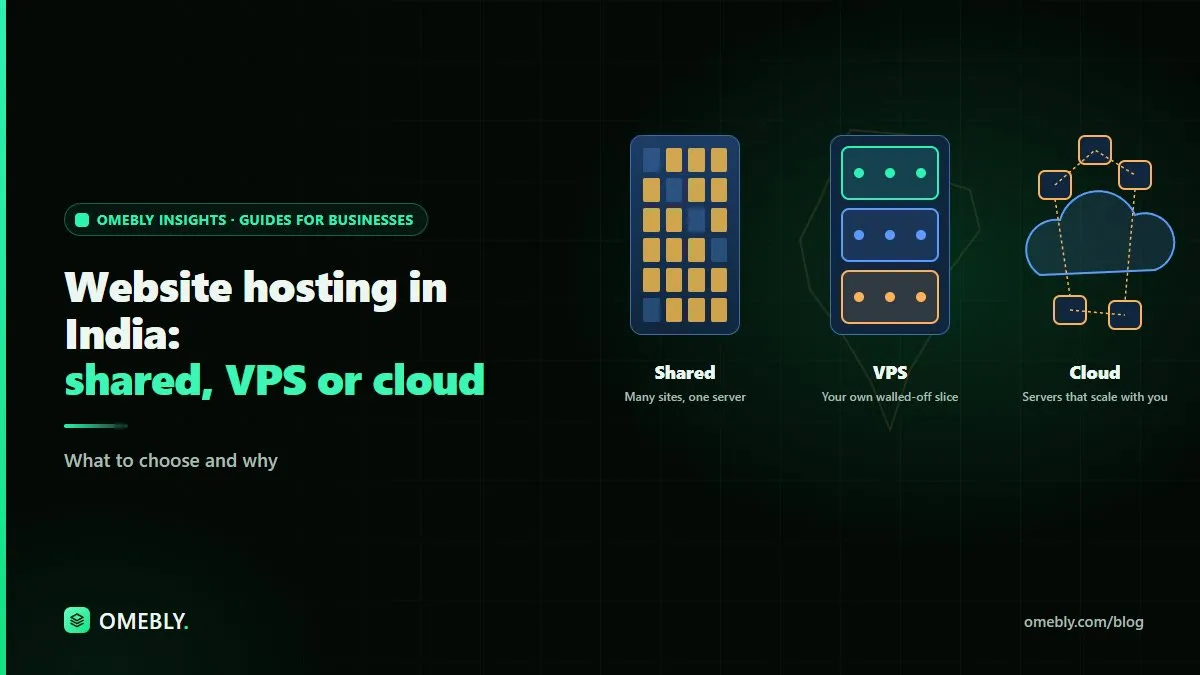
- Shared hosting is like renting a room in a busy shared flat.
- A VPS is like renting your own apartment in a building.
- Cloud hosting is like a serviced apartment network where you can add rooms whenever you need them.
Shared hosting
Many websites live on the same server and share its CPU, memory and storage.
Pros
- Lowest cost and easiest to start.
- Control panel, email and one-click installs are often included.
- The provider manages the server itself.
Cons
- Performance depends on your neighbours. A busy site on the same server can slow yours.
- Limited control over server settings and software versions.
- Resource limits can be hit during traffic spikes.
- Security isolation between sites varies by provider.
Good for: small brochure websites, portfolios and new businesses with modest traffic.
VPS hosting
A Virtual Private Server splits one physical server into isolated virtual machines. You get a reserved share of resources and your own operating system environment.
Pros
- Predictable performance, since resources are reserved for you.
- Full control: install the software and versions you need.
- Better isolation from other customers.
- Good value for busier sites.
Cons
- Someone must manage it: updates, security patches, firewall, backups and monitoring, unless you choose a managed VPS.
- Scaling usually means moving to a bigger plan, which may need downtime or migration work.
- If the physical server fails, recovery depends on the provider’s setup and your backups.
Good for: growing business sites, small and medium online stores, custom-built sites and multiple sites managed together.
Cloud hosting
Cloud hosting runs your site on infrastructure spread across many servers. Resources can be adjusted on demand, and many setups can spread traffic across several machines.
Pros
- Scale up for a sale or campaign, then scale back down.
- Better resilience to individual hardware failure.
- Wide choice of services: managed databases, storage, CDN, load balancers.
- Data centre regions in India and around the world.
Cons
- Pricing can be harder to predict, especially with usage-based billing.
- More moving parts to configure and secure.
- Needs DevOps skill, or a managed cloud service, to run well.
Good for: e-commerce sites, web apps and SaaS products, high-traffic sites, and businesses with seasonal spikes such as festive sales.
Side-by-side comparison
| Shared | VPS | Cloud | |
|---|---|---|---|
| Relative cost | Lowest | Medium | Varies with usage |
| Performance | Variable | Predictable | Predictable and scalable |
| Control | Limited | High | High |
| Scaling | Upgrade plan | Move to bigger VPS | Adjust resources on demand |
| Technical skill needed | Low | Medium to high (unless managed) | Medium to high (unless managed) |
| Resilience | Depends on provider | Single server | Can span multiple servers |
| Typical use | Small brochure sites | Growing sites, small stores | Stores, apps, spiky traffic |
What drives hosting cost
Rather than chasing the cheapest plan, understand what you’re paying for:
- Resources: CPU, RAM and storage type (SSD or NVMe is faster than older drives).
- Managed vs unmanaged: managed plans cost more but include updates and support.
- Bandwidth and traffic: especially on cloud, where data transfer can be billed.
- Backups: frequency, retention period and whether restores are included.
- Number of sites and email accounts.
- Add-ons: CDN, web application firewall, malware scanning, staging environments.
- Support quality: response times and whether support can actually fix server issues.
- Renewal pricing: introductory offers often renew at a higher rate, so check the renewal cost.
Hosting is only one part of your running budget. Our guide to e-commerce website running costs shows how hosting fits alongside apps, payments and maintenance, and our website development cost guide for India covers the build side.
Speed: hosting is the foundation
Hosting affects how quickly your server responds, which shapes every other speed metric. To get the most from it:
- Choose a data centre in or near India if most visitors are Indian.
- Use a CDN for images, scripts and styles, especially if you also serve visitors abroad.
- Enable caching (page, object and browser caching).
- Use a current, supported version of PHP, Node.js or whatever your site runs on.
- Compress and resize images before uploading. Our free image editor runs in your browser and can help with quick resizing.
- Keep the database tidy, especially on WordPress sites with many plugins.
Security: who’s responsible for what
On shared hosting, the provider secures the server and you secure your site. On an unmanaged VPS or cloud server, you are responsible for nearly everything.
Whatever the type, make sure you have:
- SSL/TLS (HTTPS) on every page.
- Automatic, off-server backups that you’ve actually tested restoring.
- Regular updates to the server software, CMS, themes and plugins.
- A firewall and, ideally, a web application firewall.
- Strong passwords and two-factor login for hosting, CMS and domain accounts.
- Malware scanning and uptime monitoring.
Our guide on how to secure a business website covers these steps in more depth.
How to choose: a quick decision guide
- Small brochure site, modest traffic, no developer? Quality shared hosting or a small managed plan.
- Shared site feels slow or keeps hitting limits? Move to a managed VPS.
- Online store or custom application? Managed VPS or cloud, depending on traffic and growth plans.
- Big seasonal spikes or a SaaS product? Cloud, with autoscaling and monitoring.
- No one to manage servers? Whatever you pick, choose a managed option or a maintenance arrangement.
Signs it’s time to upgrade
- Pages are slow even after optimising images and caching.
- The site goes down or errors appear during busy periods.
- Your host warns you about resource limits.
- You need software versions or settings your plan doesn’t allow.
- You’re adding an online store, customer logins or heavy features.
Migration checklist
- Full backup of files, database and email
- New server set up and tested on a temporary address
- SSL installed on the new server
- DNS TTL lowered before the switch
- DNS updated and propagation checked
- Forms, payments and email tested after the move
- Old hosting kept for a short overlap period
- Monitoring and backups switched on
Need help with hosting or a slow site?
If your website is slow, or you’re unsure whether shared, VPS or cloud hosting fits, Omebly’s team in Kolkata, with a sales team in Downtown Dubai, can review your setup and suggest a sensible path. See our website speed and security service or contact us to talk it through.
Frequently asked questions
Which hosting is best for a small business website in India?
For a simple brochure site with modest traffic, good shared hosting or a small managed plan is often enough. If the site is slow, runs an online store, or needs custom software, a VPS or managed cloud setup is usually a better fit.
Is VPS hosting better than shared hosting?
A VPS gives you dedicated resources and more control, so performance is more predictable and you're less affected by other sites. It also needs more technical management unless you choose a managed VPS.
What is the difference between VPS and cloud hosting?
A VPS is a fixed slice of one physical server. Cloud hosting runs on a pool of servers, so you can scale resources up or down more easily and recover from hardware failure more smoothly, often with pay-as-you-go billing.
Does server location matter for Indian visitors?
Yes. A server in or near India generally means lower delay for Indian visitors. If you also serve customers abroad, a CDN can deliver static files from locations closer to each visitor.
How much does website hosting cost in India?
Costs vary widely. Shared hosting is the cheapest, VPS costs more, and cloud costs depend on usage. The main drivers are server resources, managed support, backups, bandwidth, the number of sites and any add-ons such as CDN or security services.
Do I need managed hosting?
If nobody on your team is comfortable updating servers, applying security patches and restoring backups, managed hosting or a maintenance arrangement is worth it. Unmanaged servers left without updates become a security risk.

Written by
Nazmul Hussain, Managing Director & Technical Head, Omebly. 10+ years building websites and apps for clients in India, the Gulf, the UK and the US, and mentoring at Omebly Academy. LinkedIn · GitHub
Follow Omebly
New guides, work and launches on every channel.