Prompt Writing Basics: How to Get Useful Answers From AI Tools
A practical guide to prompt writing basics: the parts of a good prompt, before-and-after examples, and how to fix vague answers from AI tools.
You type a question into an AI tool and get back something generic, too long or slightly off. The tool isn’t broken. In most cases the prompt simply didn’t give it enough to work with. Learning prompt writing basics is the fastest way to get useful answers from AI tools, and it takes less time than you might think.
This guide gives you a simple framework, real before-and-after examples, techniques for refining answers, and a checklist you can keep next to your desk. No technical background needed.
Quick answer: A good prompt tells the AI what to do (task), why and for whom (context and audience), how it should look (format and length) and what to avoid (constraints). Add an example when style matters. If the answer misses, don’t start over; reply with specific feedback. Always check facts and keep private data out of your prompts.
Why prompts matter so much
AI tools like Claude generate answers based on the instruction you give them and the patterns they learned in training. They can’t read your mind or see your files unless you share them. When a prompt is vague, the tool fills the gaps with the most generic answer available.
Think of it as briefing a capable new colleague on their first day. If you say “write something about our product”, you’ll get something. If you explain the product, the customer, the goal and the format, you’ll get something you can use.
The anatomy of a good prompt
Use this five-part framework. You won’t need every part every time, but checking against it fixes most weak prompts.
1. Task
Start with a clear action verb: write, summarise, compare, list, rewrite, explain, plan. One main task per prompt works best.
2. Context
Give the background the AI needs: your industry, the situation, what has already happened, and relevant facts it shouldn’t guess.
3. Audience
Say who will read the output. “Explain this to a new hire” produces a very different answer from “explain this to a finance director”.
4. Format and length
Ask for the shape you want: bullet points, a table, an email, three options, under 150 words. This alone often turns a rambling answer into a usable one.
5. Constraints and examples
Mention tone, words or claims to avoid, and anything that must be included. If you have an example of the style you like, paste it in and say “match this style”.
A reusable template
You are helping me with [task]. Context: [background]. The audience is [who]. Please give me [format, length]. Keep the tone [tone]. Avoid [things to avoid]. Here is an example of the style I like: [example].
Before-and-after examples
The difference is easiest to see side by side.
Example 1: An email
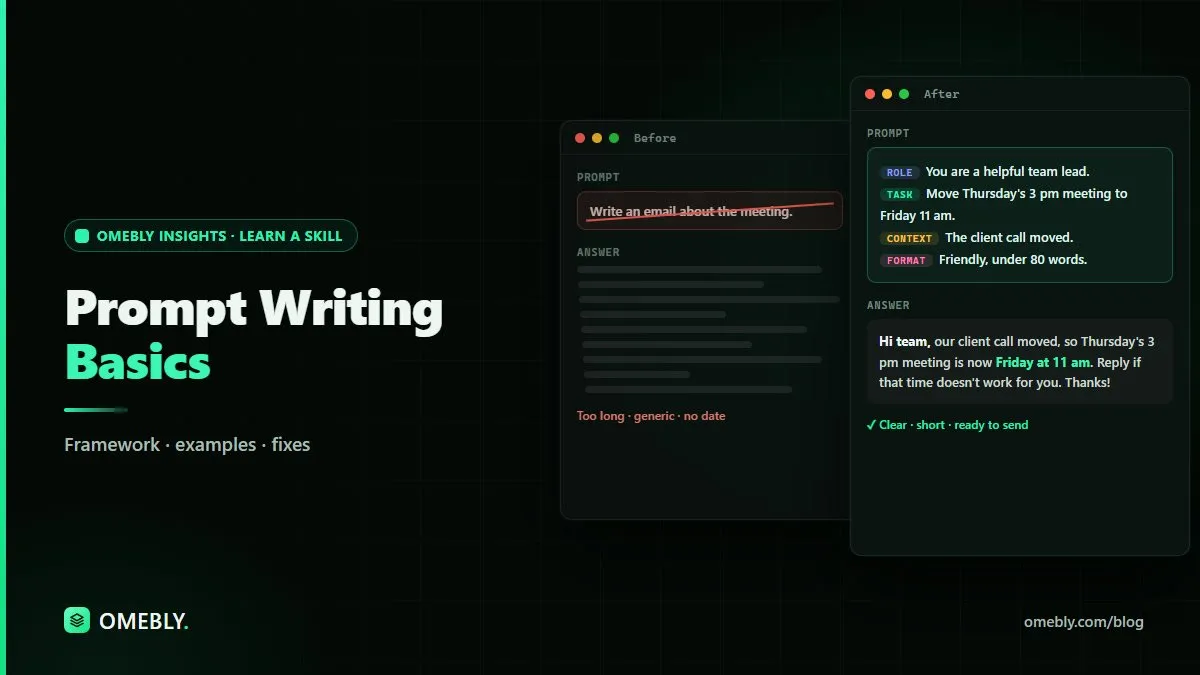
Before: “Write an email about the meeting.”
After: “Write a short email to my team rescheduling Thursday’s 3pm project meeting to Friday at 11am because the client call moved. Keep it friendly, under 80 words, and ask people to reply if Friday doesn’t work.”
The second prompt gives the reason, the new time, the tone, the length and the action.
Example 2: A summary
Before: “Summarise this.”
After: “Summarise this report for a busy manager. Give me a one-sentence overview, then five bullet points on the main findings, then any actions we need to take. Use plain English.”
For long PDFs, you can also try our free AI summarizer, then compare its summary with the original.
Example 3: Brainstorming
Before: “Give me blog ideas.”
After: “Give me ten blog post ideas for a small accounting firm whose clients are restaurant owners. Each idea should answer a real question those owners ask. Put them in a table with the title and the question it answers.”
Example 4: Data
Before: “What does this data show?”
After: “Here is a table of monthly sales by region with no customer details. Describe the three most noticeable patterns, suggest possible reasons for each, and list what extra data would confirm them. Don’t state any reason as fact.”
That last line is important: it reminds the AI not to present guesses as conclusions. Before trusting any analysis, make sure the data is clean; our data cleaning checklist explains what to look for.
How to refine an answer instead of starting over
Your first prompt rarely gives a perfect result. The real skill is the follow-up.
- Be specific about what’s wrong. “Make it shorter” is fine; “cut it to three sentences and remove the jargon” is better.
- Keep what works. “Keep the opening line, but rewrite the rest in a warmer tone.”
- Ask for options. “Give me three alternative headlines” lets you choose instead of hoping.
- Ask it to question you. “Before you write this, ask me any questions you need answered.” This surfaces gaps in your brief.
- Break big tasks into steps. Ask for an outline first, agree it, then ask for each section.
Useful prompt techniques
Ask for step-by-step reasoning
For problems with several steps, ask the AI to “work through this step by step and show your reasoning”. It makes the logic easier to check.
Give it a role
“Act as an experienced editor” or “act as a patient tutor” sets the tone and level of the answer. A role doesn’t make the AI an expert, though. You still need to check the content.
Set what to do when unsure
Add “If you’re not sure about something, say so rather than guessing.” This won’t stop every error, but it encourages more careful answers.
Use delimiters for pasted text
When you paste a document, separate it clearly: “The text to summarise is between the lines below.” This helps the tool tell your instructions apart from your content.
Common prompt mistakes
| Mistake | Fix |
|---|---|
| One-line, vague questions | Add task, context, audience and format |
| Several unrelated tasks in one prompt | Split into separate prompts |
| No length or format | Say exactly how long and what shape |
| Accepting the first answer | Refine with specific feedback |
| Pasting sensitive data | Remove personal and confidential details first |
| Trusting facts without checking | Verify against an original source |
Responsible prompting: privacy and accuracy
Good prompting isn’t only about better answers. It’s also about using AI safely.
- Keep private data out. Don’t paste customer names, contact details, passwords, financial account details or confidential plans unless your organisation has approved the tool for that data.
- Check every fact. AI can invent figures, quotes, references and links. Confirm anything important before you use it.
- Follow your workplace rules. Many organisations have AI policies. Know yours.
- Own the final result. If you send it, you’re responsible for it, not the tool.
A prompt checklist to keep handy
Before you hit enter, ask yourself:
- Is the task clear, with one main action?
- Have I given the context the AI can’t guess?
- Have I said who the audience is?
- Have I set the format and length?
- Have I added constraints or an example?
- Have I removed anything private?
- Will I check the output before using it?
Prompting skills transfer well to technical work too. If you’re learning to code, AI tools can explain errors and suggest fixes, and our Python learning roadmap shows where that fits.
How Omebly can help
Prompt writing is a core skill in Omebly Academy’s Generative AI course, where you practise on real tasks in live classes. The course runs for 8 weeks with 16 live classes and costs USD 280. It’s taught live by Nazmul Hussain’s team; Nazmul Hussain is Omebly’s Managing Director and Technical Head, with 10+ years of experience building digital products.
If you’d like a broader foundation, the Artificial Intelligence course is another option. Browse every course on the Omebly Academy training page.
Want to write prompts that get useful answers every time? See the Generative AI course.
Frequently asked questions
What is a prompt in AI?
A prompt is the instruction or question you give an AI tool. It can be a single sentence or a detailed brief with context, examples and the format you want back.
What makes a good AI prompt?
A good prompt states the task clearly, gives relevant context, says who the output is for, sets limits such as length and tone, and names the format you want. Examples of the style you like also help.
Is prompt engineering hard to learn?
The basics are easy to learn. Most improvement comes from being specific and refining the prompt over a few turns rather than from special tricks.
Why does AI give me wrong answers even with a good prompt?
AI tools predict likely text and can produce confident mistakes. A good prompt reduces errors but doesn't remove them, so always check facts, numbers and sources.
Should I use the same prompt in different AI tools?
You can, and the core framework works across tools. Results will vary, so test your important prompts in the tool you actually use and adjust as needed.

Written by
Nazmul Hussain, Managing Director & Technical Head, Omebly. 10+ years building websites and apps for clients in India, the Gulf, the UK and the US, and mentoring at Omebly Academy. LinkedIn · GitHub
Follow Omebly
New guides, work and launches on every channel.