UTM Parameters Explained: Track Every Campaign Link
UTM parameters tell your analytics exactly where each visitor came from. Learn the five tags, a simple naming system and the mistakes that ruin reports.
You post a link on social media, send a newsletter, run a paid ad and ask a partner to share your offer. A week later your analytics shows a jump in visitors, but you can’t tell which effort caused it. Half the traffic is labelled “direct” or “referral”, and nobody knows what worked.
UTM parameters fix this. They’re small tags you add to the end of a link so your analytics tool knows exactly where each visitor came from. This guide explains each tag, shows how to build tracked links, and gives you a naming convention your whole team can follow.
Quick answer: UTM parameters are tags added to a URL, such as
?utm_source=instagram&utm_medium=social&utm_campaign=diwali_sale, that tell analytics tools like GA4 the source, medium and campaign behind each visit. Use them on every external campaign link, keep values lowercase and consistent, and never use them on internal links.
What are UTM parameters?
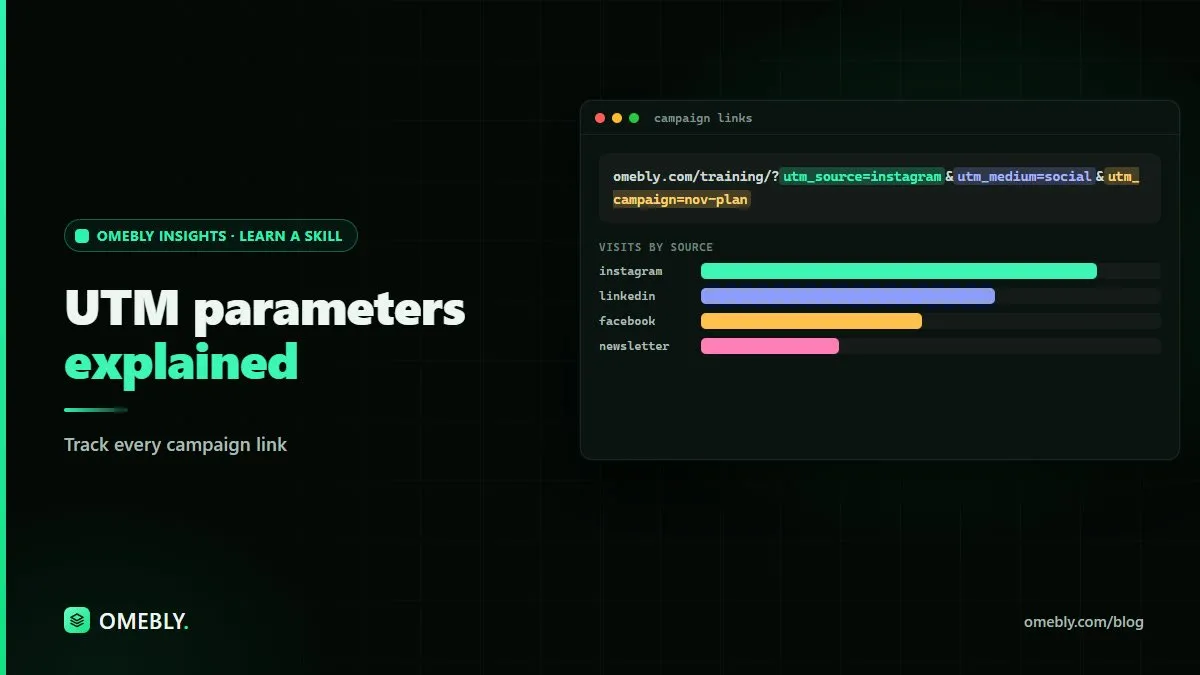
UTM stands for Urchin Tracking Module, a name left over from an early analytics product. The idea is simple: you add a question mark to the end of your link, followed by tags in the form name=value, joined by &.
Here’s an example:
https://example.com/offer?utm_source=newsletter&utm_medium=email&utm_campaign=winter_launchWhen someone clicks that link, your website loads normally. Your analytics tool reads the tags and records the visit as coming from your newsletter, through email, as part of the winter launch campaign.
The five UTM parameters
| Parameter | What it answers | Example values |
|---|---|---|
utm_source |
Where did the click come from? | instagram, newsletter, partner_blog |
utm_medium |
What type of traffic is it? | social, email, cpc, referral |
utm_campaign |
Which campaign or promotion? | diwali_sale, winter_launch |
utm_content |
Which link, ad or version? | banner_top, video_ad_a |
utm_term |
Which keyword (mainly for paid search)? | running_shoes |
Source vs medium
These two get mixed up most often. Think of source as the specific place (a platform, a website, a newsletter) and medium as the channel type (social, email, paid). Instagram is a source; social is a medium.
Keep medium values aligned with the channel groupings your analytics tool expects. In GA4, values like email, social, cpc and referral help traffic land in the right default channel. Inventing new medium names can push visits into an “unassigned” bucket.
How to build a UTM link, step by step
- Start with the final landing page URL. Make sure it’s the exact page you want people to reach.
- Choose your values for source, medium and campaign using your team’s naming convention (more on that below).
- Add optional tags. Use
utm_contentif you’re testing different ads or links in the same campaign. - Join everything together. Add
?after the URL, then each tag separated by&. If the URL already has a?, start your tags with&instead. - Test the link. Click it, check the page loads, and confirm the visit appears in your analytics real-time report.
- Shorten if needed. Long links look messy on social posts. A link shortener keeps the tags while hiding them from view.
- Record it. Add the link to a shared tracking sheet.
You can build links by hand, use a free URL builder, or create a simple spreadsheet formula that combines columns into a finished link.
Create a naming convention (and stick to it)
UTM data is only useful if it’s consistent. If one person writes Facebook, another writes facebook and a third writes fb, your report shows three separate sources.
A simple convention:
- Lowercase everything. UTM values are case sensitive.
- Use underscores instead of spaces. Spaces become
%20and are easy to mistype. - Fix a list of allowed sources and mediums. Keep it in your tracking sheet.
- Name campaigns with a pattern, for example
yyyy_mm_campaignname, such as2026_11_winter_launch. - Describe content clearly, for example
story_swipe,email_header_button,video_ad_b.
A sample tracking sheet
Set up columns for: date, channel owner, landing page, source, medium, campaign, content, final URL, and notes. Everyone building links uses the sheet, so values stay consistent and you have a record of every campaign.
Where to use UTM parameters
Use them on links that bring people to your site from outside:
- Social media posts, bios and stories
- Email newsletters and automated emails
- Paid ads where automatic tagging isn’t set up
- Partner, influencer and affiliate links
- QR codes on posters, packaging and flyers
- Links in PDFs, slide decks and digital brochures
Where not to use them
Never put UTM parameters on internal links, such as a banner on your homepage that links to your sale page. Clicking it can start a new session with the wrong source, so the visitor’s real origin disappears from your reports.
UTM parameters for offline and print campaigns
UTM tags aren’t only for digital channels. Posters, flyers, packaging inserts and event banners can all send people to your website through a QR code, and a QR code is just a link. Add UTM parameters to that link before you create the code.
For example, a café running a festive promotion might create one link for its table cards and another for its window poster, using the same campaign name with different source or content values:
https://example.com/menu?utm_source=table_card&utm_medium=print&utm_campaign=2026_12_festive_menuA few tips for printed links:
- Use a separate link for each printed format, such as poster, flyer and packaging, so you can compare them.
- Test the QR code on more than one phone before printing.
- Point the code at a page you control, so you can update the destination later without reprinting.
- Keep a printed sample with the link details in your tracking sheet.
This turns offline marketing, which is usually hard to measure, into something you can compare in the same reports as your online campaigns.
Reading UTM data in GA4
Once your links are live, the data appears in your analytics reports. In GA4:
- Open the traffic acquisition report.
- Switch the primary dimension to session source / medium or session campaign.
- Add a secondary dimension, such as session manual ad content, to compare individual links.
- Look at engagement and conversions, not just visits.
Traffic alone doesn’t tell you much. Pair your UTM tags with properly configured conversions so you can see which campaigns lead to sign-ups, enquiries or sales. Our guide to setting up GA4 key events walks through that part. If you’re new to the platform, start with our GA4 tutorial for beginners.
Common UTM mistakes
- Inconsistent capitalisation splitting one source into several.
- Tagging internal links and overwriting real sources.
- Forgetting to test and sending people to a broken page.
- Vague campaign names like
testorcampaign1that mean nothing in three months. - Putting personal data in UTM values, such as an email address. URLs get stored in many places, so never include personal information.
- No shared record, so nobody knows which links exist.
Using AI to speed up UTM work, responsibly
AI tools like Claude can help with the repetitive parts. You can ask one to generate a batch of tagged links from your naming rules, check a list of links for inconsistent values, or draft a short guide for your team. After a campaign, you can export your report and ask for a plain-language summary. For long PDF reports, our free AI summarizer can give you a quick overview to check against the full numbers.
Keep these rules in mind:
- Check every link before it goes live. AI can mistype values or break URL formatting.
- Verify the numbers. Compare any AI summary against the actual report before sharing it.
- Protect data. Don’t paste customer lists, personal details or confidential results into a tool your organisation hasn’t approved.
Learn campaign tracking properly
UTM parameters are one small piece of measuring marketing well. Omebly Academy’s Digital Marketing course covers campaigns, analytics and reporting, taught live by Nazmul Hussain’s team. Nazmul Hussain is Omebly’s Managing Director and Technical Head, with 10+ years of experience building digital products.
If you’d like to use AI for planning, content and reporting, the AI for Digital Marketing course runs for 8 weeks with 16 live classes and costs USD 280. You can compare every option on the Omebly Academy training page.
Ready to track every campaign with confidence? See the Digital Marketing course.
Frequently asked questions
What are UTM parameters?
UTM parameters are short tags added to the end of a link that tell your analytics tool where a visitor came from, such as the platform, the type of traffic and the campaign name.
Which UTM parameters are required?
In practice, always use utm_source, utm_medium and utm_campaign. utm_content and utm_term are optional and help when you want to compare individual ads, links or keywords.
Are UTM parameters case sensitive?
Yes. Most analytics tools treat 'Facebook' and 'facebook' as different sources, which splits your data. Use lowercase for every value to keep reports clean.
Should I use UTM parameters on internal links?
No. Adding UTM tags to links within your own website can overwrite the visitor's original source and make your reports inaccurate. Use them only on links that bring people to your site from elsewhere.
Where do I see UTM data in GA4?
In GA4, look at the traffic acquisition reports and choose dimensions such as session source, session medium and session campaign. You can also use explorations to break results down by utm_content.
Do I need UTM tags on ad platforms that track automatically?
Some ad platforms can add tracking automatically when linked to your analytics. Check your setup first. Where automatic tagging isn't available or doesn't cover a channel, add UTM parameters manually.

Written by
Nazmul Hussain, Managing Director & Technical Head, Omebly. 10+ years building websites and apps for clients in India, the Gulf, the UK and the US, and mentoring at Omebly Academy. LinkedIn · GitHub
Follow Omebly
New guides, work and launches on every channel.