SQL for Beginners: How to Learn SQL for Data Analysis
SQL is the most useful skill in data analysis. This guide shows what to learn, in what order, and how to practise with real business questions.
If you want to work with data, SQL is the skill you will use most. Dashboards, reports, Python notebooks and machine learning models nearly always start with a SQL query that pulls the right rows from a database. The good news is that SQL is small, logical and quick to become productive in. Whether you join a SQL course online or teach yourself, this guide shows exactly what to learn for data analysis, in what order, and how to practise.
Quick answer: To learn SQL for data analysis, start with SELECT, WHERE, ORDER BY, GROUP BY and aggregate functions. Then learn JOINs, subqueries, CTEs, CASE and date functions. Next, master window functions and basic database design (normalisation, indexes, views). Practise on a free database such as PostgreSQL using real business questions. Most beginners become comfortable in about three months.
What SQL is and why analysts need it
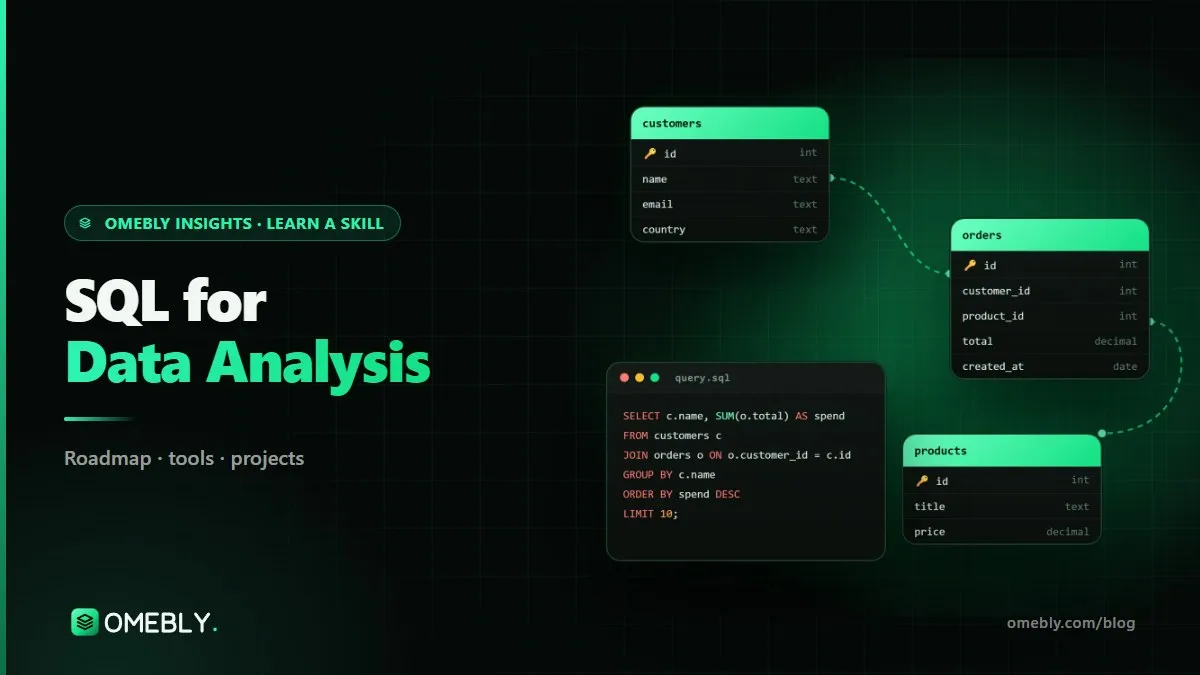
SQL (Structured Query Language) is the standard language for working with relational databases. A relational database stores data in tables, such as customers, orders and products, linked by keys.
What you do with SQL as an analyst
- Retrieve the rows and columns you need.
- Filter to a date range, region or customer type.
- Combine tables, for example orders with customers.
- Summarise with totals, averages and counts.
- Analyse trends with rankings, running totals and period comparisons.
Why SQL beats spreadsheets for real data
Spreadsheets slow down and break with large datasets and make it easy to overwrite data by accident. SQL works on millions of rows, leaves the source data untouched and gives you a repeatable query you can run again tomorrow.
SQL dialects
PostgreSQL, MySQL, SQL Server, BigQuery and Snowflake all use SQL with small differences. Learn the standard concepts well on one database and switching later is easy. The PostgreSQL documentation includes a friendly tutorial.
SQL skills by stage
Stage 1: Querying basics
- How relational tables, rows, columns and keys work.
SELECTandFROM, column aliases.WHEREwith AND, OR, IN, BETWEEN, LIKE and NULL handling.ORDER BYandLIMIT.- Aggregates: COUNT, SUM, AVG, MIN, MAX with
GROUP BYandHAVING.
Stage 2: Combining and shaping data
- INNER, LEFT and FULL JOINs, and how to avoid duplicate rows.
- Subqueries.
- Common table expressions (CTEs) with
WITHfor readable, step-by-step queries. CASEexpressions for custom categories.- String and date functions for cleaning and grouping by period.
Stage 3: Analytical SQL and design
- Window functions: ROW_NUMBER, RANK, LAG, LEAD and running totals with
OVER (PARTITION BY ... ORDER BY ...). - Schema design and normalisation: why tables are split the way they are.
- Indexes and why some queries are slow.
- Views for reusable logic.
Stage 4: Professional database skills
- Query optimisation and reading query plans.
- Stored procedures and transactions.
- PostgreSQL and MySQL administration basics.
Stage 5: Modern analytics stack
- Data warehousing concepts, with an introduction to BigQuery or Snowflake.
- dbt basics for version-controlled, tested SQL transformations.
- Building a full analytics database for a business.
Tools for learning SQL
| Tool | Use |
|---|---|
| PostgreSQL | Main database for practice; free and standards-friendly |
| MySQL | Very common in web applications |
| DBeaver | Free client that connects to almost any database |
| pgAdmin | PostgreSQL’s own management tool |
| BigQuery (intro) | Cloud data warehouse used by many analytics teams |
| dbt (intro) | Transforms and tests data inside a warehouse with SQL |
| Git | Version control for your queries and projects |
Install PostgreSQL and DBeaver in your first week. That combination is enough for months of learning.
A month-by-month plan to learn SQL
Plan four to six hours a week. Use a realistic dataset such as an online store with customers, orders, order items and products.
Month 1: Foundations
- Week 1: install PostgreSQL and DBeaver, load sample data, explore the tables.
- Week 2: SELECT, WHERE, ORDER BY, LIMIT.
- Weeks 3 to 4: GROUP BY, HAVING and aggregates.
Milestone: answer 15 business questions, such as “top 10 products by revenue last quarter”.
Month 2: JOINs and readable queries
- JOIN types, with a test for each: count rows before and after joining.
- Subqueries, then CTEs to break long queries into steps.
- CASE and date functions for monthly and weekly reporting.
Milestone: a monthly sales report by region and category built entirely in SQL.
Month 3: Window functions and design
- Rankings, running totals, month-on-month change and first/last purchase.
- Design a small database from scratch: entities, keys, normalisation.
- Indexes and views.
Milestone: a customer cohort and retention analysis using window functions.
Months 4 to 6: Professional skills
Query optimisation, stored procedures, transactions and admin basics for PostgreSQL and MySQL.
Months 7 to 12: The analytics stack
Data warehousing with BigQuery or Snowflake, dbt basics and one full analytics database project. At this point, connecting SQL to Power BI is a natural next step; see our Power BI roadmap.
SQL practice projects for your portfolio
- E-commerce sales analysis. Revenue trends, best-selling products, average order value and repeat customers.
- Customer cohort and retention queries. Group customers by first purchase month and track how many return.
- Library or school database design. Design tables, keys and constraints, then write the queries a librarian or school office would need.
- HR analytics with window functions. Headcount over time, tenure bands, rankings within each department and attrition by team.
Save each project as a Git repository with your schema, your queries and a short README listing the questions and answers.
Common SQL mistakes beginners make
SELECT * everywhere
Pulling every column is slow and hides what you need. Name the columns.
JOINs that multiply rows
Joining on a non-unique key silently duplicates rows and inflates totals. Always check row counts.
Misunderstanding NULL
NULL = NULL is not true in SQL. Use IS NULL and think about how NULLs affect counts and averages.
Filtering aggregates in WHERE
WHERE filters rows before grouping; HAVING filters groups after. Mixing them up is a classic error.
Giant unreadable queries
A 200-line query with nested subqueries is hard to debug. Use CTEs, clear aliases and comments.
Careers that rely on SQL
SQL appears in a very wide range of roles:
- Data analyst and BI analyst: daily querying for reports and dashboards. See how to become a data analyst.
- Business, product and marketing analysts: answering questions directly from the data.
- Database developer or administrator: designing, tuning and maintaining databases.
- Data engineer: building pipelines and warehouses.
- Back-end developer: writing queries inside applications.
Openings and pay vary by country, industry and experience. SQL on its own is a strong start; combined with Excel, a BI tool or Python, it becomes much more valuable.
SQL readiness checklist
- I can write JOINs and explain why a row count changed.
- I use CTEs to keep queries readable.
- I can write rankings, running totals and LAG/LEAD comparisons.
- I can design a small normalised schema.
- I have three or four projects with queries and write-ups on GitHub.
How to choose a SQL course online
SQL tutorials are everywhere, and many are good. The value of a structured SQL course online is practice on realistic data, a clear order and someone checking that your queries are not just running, but correct.
What to look for
- A real database, not a browser sandbox. You should install and use PostgreSQL or MySQL with a proper client, because that is how real work happens.
- Business questions, not syntax drills. Exercises should read like a manager’s request, such as “which customers bought once and never returned?”
- Window functions and CTEs. These are expected in many analyst interviews, so make sure the course goes beyond basic SELECT and JOIN.
- Database design. Understanding normalisation, keys and indexes helps you write better queries and talk to developers and data engineers.
- Feedback on your queries. A query can run and still be wrong, for example by double-counting after a JOIN. A mentor reviewing your work catches these quietly dangerous mistakes.
- A path to the wider stack. Look for links to warehousing, dbt, Power BI or Python, depending on your goals.
Questions to ask before you enrol
Which database is the main one taught? Are classes live with recordings? How many projects will I finish, and will they go on GitHub? Is there interview practice for SQL tests?
Red flags
Avoid courses that promise a job or claim you will master SQL in a weekend. The basics are quick, but writing correct analytical SQL on messy data takes months of practice.
A simple daily habit
Write at least one query a day against your practice database, even on busy days. Keep a notes file of patterns you use often, such as deduplication with ROW_NUMBER or month-on-month change with LAG. Within a few weeks it becomes your personal SQL cookbook.
Learn it with Omebly
Omebly Academy’s SQL and Databases course teaches SQL that answers real business questions, with a live mentor. It suits aspiring data analysts, developers who want stronger database skills and Excel users moving to databases. The main database is PostgreSQL, with MySQL differences covered. No prior experience is needed, and your level is checked in a free first call. Classes are live with recordings and weekly one-to-one reviews.
- Core (3 months, $699): relational basics, SELECT, GROUP BY and aggregates; JOINs, subqueries, CTEs, CASE, string and date functions; window functions, schema design, normalisation, indexes and views, with two capstone projects.
- Professional (6 months, $1,199): adds query optimisation, stored procedures, transactions and PostgreSQL and MySQL admin basics, four capstone projects, mock interviews and portfolio review.
- Career (12 months, $1,999): adds data warehousing (BigQuery and Snowflake intro), dbt basics and a full analytics database project, a live client-style project with the Omebly team, unlimited mentor reviews and placement assistance.
You receive an Omebly certificate of completion with your projects listed. Placement assistance covers CV and LinkedIn help, mock interviews, portfolio review and referrals where possible; it is not a job guarantee. If you want SQL as part of a wider analyst programme, look at the Data Analysis course.
Want help choosing? Contact us or message us on WhatsApp to book a free call.
Frequently asked questions
How long does it take to learn SQL for data analysis?
Basic queries take a couple of weeks of regular practice. JOINs, CTEs and window functions, which most analyst roles expect, usually take two to three months to become comfortable with.
Which database should I learn SQL on?
PostgreSQL is a strong choice: it is free, widely used and follows the SQL standard closely. Once you know it, switching to MySQL, SQL Server or BigQuery mainly means learning small syntax differences.
Is SQL a programming language?
SQL is a query language. You describe the result you want and the database works out how to get it. It is much smaller than a general programming language, which is why beginners can become productive quickly.
Do I need SQL if I already use Excel or Power BI?
Yes, in most analyst roles. Business data lives in databases, and most BI work starts with SQL. It also handles far larger data than Excel can.
What are window functions in SQL?
Window functions calculate values across a set of related rows without collapsing them into one, for example running totals, rankings and month-on-month change. They are one of the most useful intermediate SQL skills.
Will learning SQL get me a job?
SQL is one of the most requested data skills, but no course can promise a job. Omebly offers placement assistance, such as CV help, mock interviews and portfolio review, not a job guarantee.

Written by
Nazmul Hussain, Managing Director & Technical Head, Omebly. 10+ years building websites and apps for clients in India, the Gulf, the UK and the US, and mentoring at Omebly Academy. LinkedIn · GitHub
Follow Omebly
New guides, work and launches on every channel.